
𝗔 𝗴𝗼𝗼𝗱 𝘂𝘀𝗲 𝗰𝗮𝘀𝗲 𝘂𝘀𝗶𝗻𝗴 𝗖𝗵𝗮𝘁𝗚𝗣𝗧 𝗶𝗻 𝗶𝗻𝘁𝗲𝗴𝗿𝗮𝘁𝗶𝗼𝗻 𝘄𝗶𝘁𝗵 𝗣𝗼𝘄𝗲𝗿𝗕𝗜
Automatically generate measure descriptions for Power BI models with ChatGPT

Understanding DAX code from the perspective of a consumer who has not build the data model can be quite difficult.
✅ That's why, adding some descriptions to DAX calculations is a good way to give users additional context and detailed definitions about the Power BI data model.
✅To do this automatically, we can run a C# script in #TabularEeditor in order to import description metadata into the model from an input file.
👉 Here is a Michael Kovalsky script: https://lnkd.in/eYjsevTa
Ask ChatGPT to describe DAX calculations with human language:
✨ With the emergence of #ChatGPT lately and our excitement about its ability to generate code for us,👉here is a cool use case provided by Darren Gosbell showing how to use #ChatGPT with Power BI, to add DAX calculations descriptions from the responses gathered by #ChatGPT , which will be then integrated into the C# script.
So instead of asking #chatGPT to generate DAX code, in this example we will do the reverse task and ask it to generate simple statements about what a DAX code does, it is really interesting!!
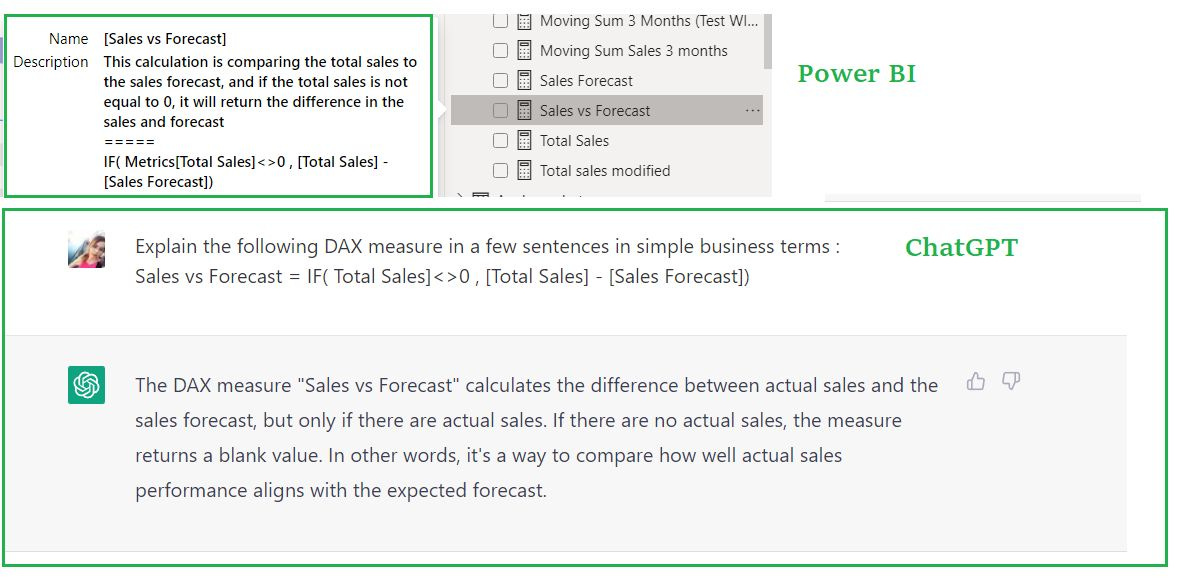
👉 See the full details in Darren Gosbell article: you just need to take the C# script, run it in Tabular Editor by inserting your own API key which will request the ChatGPT REST API.
The script will loop through all the measures in your data model and generate the description with the one suggested by ChatGPT.
⛔ #ChatGPT can only be used as a starting point to get comprehensive answers regarding the purpose of the measures, it can in some cases not give fully accurate answers.
I will have to try that. I didn't realise Tabular editor used C# as its scripting language. I have a search and replace snippet of code for renaming all the DAX insides, which was also very helpful